Personal advice
Not sure which version is right? We help private and business customers.

Our advice team
Phone Mon–Fri 9 am to 2 pm, email daily 9 am to 9 pm
- Item number: LI-801377
- Devices: 1 PC
- Licence term: 1 year
- Language: German
- Country zone: Germany
- Shipping method: E-Mail
- Manufacturer: Buhl Data

What's Included
- Instant delivery – Key & download via email
- Exchange possible as long as the key has not been redeemed
- Guide to installation and activation
- Invoice with VAT shown
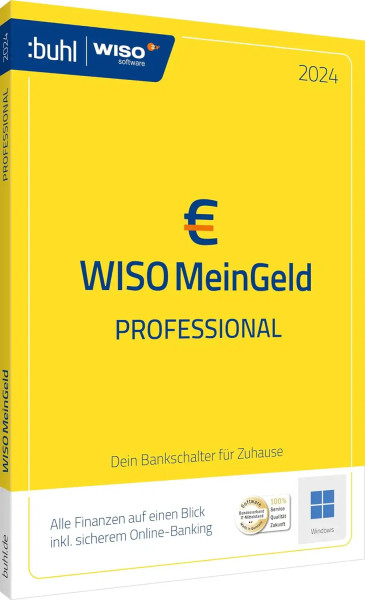
WISO Mein Geld Professional 2024
WISO Mein Geld Professional 2024 from Buhl Data is the personal finance software for accounts, budgets and assets. The program is clearly laid out and quick to get started with, even without prior knowledge.
You receive an activation code and the download by email. You use the 2024 edition without a subscription. The program runs on Windows.
What’s included in WISO Mein Geld Professional 2024
- All accounts from several banks in one program
- Online banking with transfers and standing orders
- Automatic categorisation of transactions
- Budgets and savings goals
- Overview of your assets
- Link receipts and contracts
- Portfolio management with prices and reports for securities
Who is WISO Mein Geld Professional 2024 for?
- Private individuals who want to manage their finances in one place
- Families with several accounts
- Savers with securities accounts and instant-access savings
- Anyone who wants to take stock regularly
Licence at a glance
| Manufacturer | Buhl Data Service GmbH |
| Platform | Windows |
| Licence | 2024 edition, no subscription |
| Activation | Activation code in the program or in your Buhl account |
| Delivery | Activation code and download by email |
More WISO programs in this series
| WISO Mein Geld 2024 | Annual edition – Windows |
| WISO Mein Geld 365 | 1-year term – Windows |
| WISO Mein Geld Professional 365 | 1-year term – Windows |
You will find more programs in the categories Tax and finance and Office and finance.
Why use dedicated software?
Account balances, savings plans and fixed costs quickly end up spread over many places. Finance software brings it all together and shows at a glance how your income, spending and assets are developing.
An example from practice
A couple manages current accounts, instant-access savings and a credit card in one program. Transactions are categorised automatically, and the monthly report shows where they can save.
Software from Germany
The WISO programs come from Buhl Data Service GmbH in Burbach in the Siegerland region, which has been developing software for tax, finance and office work for decades. Terms, forms and processes are tailored to German regulations. You store your data locally on your own computer, so you stay in control of what happens to it. If you have questions about using the program, our support team can also help by email, phone or remote maintenance.
Tips for getting started
- Set up your master data completely at the start – it saves time later.
- Enter data as you go rather than once a year.
- Back up your data regularly to an external drive.
- Use the templates and wizards instead of setting everything up by hand.
- Keep your activation code and invoice in a safe place.
System requirements
- Operating system (Windows): Windows 10 or Windows 11
- Memory: at least 4 GB recommended
- Hard disk: about 1 to 2 GB of free space
- Internet: required for activation and online functions
Installation and activation
- Download the program via the link in our email.
- Start the installation and follow the wizard.
- Enter the activation code when the program asks for it – if necessary, sign in to your Buhl account to do so.
- Set up your master data and start working.
Frequently asked questions about WISO Mein Geld Professional 2024
Is this a subscription?
No. You buy the 2024 edition once and use it with no ongoing costs.
Does the software run on a Mac?
No, this edition is for Windows.
Can I transfer data from an older version?
As a rule, yes: newer WISO editions take over the data from the previous version. Make a backup beforehand.
Where is my data stored?
Your data is stored locally on your computer. An internet connection is used for online functions such as retrieving account transactions.
What does “WISO” stand for?
WISO is the well-known software range from Buhl Data for tax, finance and office work.
Can I exchange the licence?
Yes, as long as the product key has not yet been redeemed or activated. Simply send us an e-mail.
Will I receive an invoice?
Yes, with VAT shown, with your company address on request.
Delivery, invoice and support
- Delivery by e-mail: you will usually receive the activation code, download link and instructions within 5 to 30 minutes of payment (daily 09:00–21:00 CET). More under Shipping & payment.
- Invoice: every order comes with a proper invoice, with your company address on request.
- Origin of the licence: we source our licences from distributors and wholesalers in Europe. We explain exactly how this works on the page Buying legal software.
- Support: if you have questions about installation or activation, we help by e-mail (Mon–Sun 09:00–21:00 CET), phone (Mon–Fri 09:00–14:00 CET), live chat or remote support with TeamViewer.
Our goodwill promise
If the edition you ordered is ever no longer available, we will supply the next higher edition for the same year at no extra charge – for example a more comprehensive version. You never pay more than the price at which you ordered.