Personal advice
Not sure which version is right? We help private and business customers.

Our advice team
Phone Mon–Fri 9 am to 2 pm, email daily 9 am to 9 pm
- Item number: LI-800647
- Devices: 1 PC/MAC
- Licence term: Permanently valid
- Language: All languages
- Country zone: Worldwide
- Shipping method: E-Mail
- Manufacturer: Adobe

What's Included
- Instant delivery – Key & download via email
- Exchange possible as long as the key has not been redeemed
- Guide to installation and activation
- Invoice with VAT shown
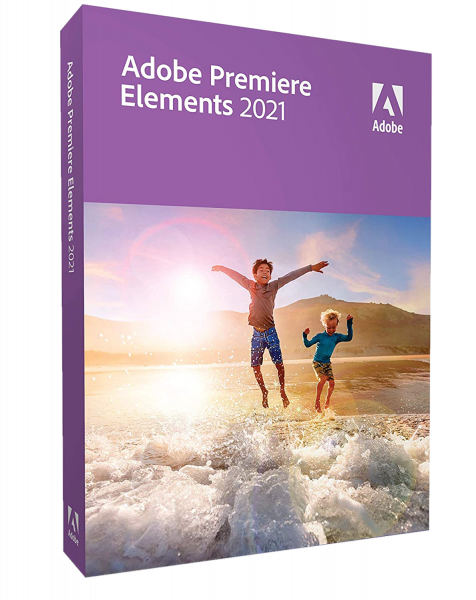
Adobe Premiere Elements 2021
Adobe Premiere Elements makes video editing easy: guided edits explain every step, automatic features turn your clips into movies and highlight reels, and you can add titles, transitions and music in just a few clicks.
You receive a perpetual licence for one device – buy once, no subscription. To activate, you sign in with a free Adobe account. You choose Windows or Mac directly on this page.
What’s included in Adobe Premiere Elements 2021
- Step-by-step guided edits
- Cut, trim and join videos
- Titles, transitions and effects
- Add music and commentary
- Automatically created movies and photo reels
- Export for YouTube, smartphone and TV
Who is Adobe Premiere Elements 2021 for?
- Families with lots of phone videos
- Amateur filmmakers
- Clubs and schools
- Beginners who want Adobe technology without a subscription
Licence at a glance
| Manufacturer | Adobe |
| Licence | Perpetual licence for 1 device, no subscription |
| Platform | Windows or Mac (selectable) |
| Activation | Serial number, sign-in with an Adobe account |
| Delivery | Serial number and download by e-mail |
Other Adobe editions
| Adobe Photoshop & Premiere Elements 2023 | Photo and video editing in one bundle |
| Adobe Photoshop & Premiere Elements 2024 | Photo and video editing in one bundle |
| Adobe Photoshop & Premiere Elements 2026 | Photo and video editing in one bundle |
| Adobe Photoshop Elements 2022 | Photo editing for beginners and advanced users |
| Adobe Photoshop Elements 2023 | Photo editing for beginners and advanced users |
| Adobe Photoshop Elements 2024 | Photo editing for beginners and advanced users |
| Adobe Photoshop Elements 2026 | Photo editing for beginners and advanced users |
| Adobe Premiere & Photoshop Elements 2022 | Photo and video editing in one bundle |
| Adobe Premiere Elements 2022 | Video editing for beginners |
| Adobe Premiere Elements 2023 | Video editing for beginners |
You will find more programs in the category Multimedia and graphics.
Elements or professional software?
The Elements programs are the entry-level versions of Adobe’s professional programs Photoshop and Premiere Pro. They contain the most important tools but explain them with guided edits and automatic features. If you work professionally every day, choose Creative Cloud; for families, hobbies and clubs, the Elements programs are usually all you need.
Why Adobe?
Adobe invented the PDF format and, with Photoshop, Illustrator and Premiere, has shaped image and media editing for decades. Files from Adobe programs can be exchanged easily with print shops, agencies and clients, and there are tutorials and learning videos for almost every question. Working with Adobe means using the same tools professionals rely on every day.
An example from practice
A father edits the family’s holiday videos together, adds titles and music and, in a few clicks, creates a short film for the grandparents.
What to look out for when buying
- Check that your system meets the requirements.
- Older versions are cheaper and sufficient for many tasks.
- You need a free Adobe account for activation.
- All programs are supplied as a download.
- If you have any questions before buying, we are happy to advise you by e-mail, phone or live chat.
Tips for getting started
- Use the guided edits or tutorial videos from Adobe to get started quickly.
- Work with copies of your files at first.
- Save your projects regularly and make backups.
- Keep your serial number or code and the invoice in a safe place.
System requirements
- Operating system: Windows 10 or Windows 11 (64-bit) or current macOS versions
- Memory: at least 8 GB recommended
- Hard disk: about 4 to 10 GB of free space, depending on the program
- Internet: required for activation, sign-in and online features
- Account: free Adobe account
Adobe lists the exact requirements on its website.
Installation and activation
- Download the program via the link in our email.
- Start the installation.
- Sign in with your Adobe account and enter the serial number.
- Done – Adobe Premiere Elements 2021 is ready to use.
Frequently asked questions about Adobe Premiere Elements 2021
Is this a subscription?
No. You buy a perpetual licence and use the program with no ongoing costs.
Do I need an Adobe account?
Yes, a free Adobe account is required for activation.
Does the program run on a Mac?
Yes, you choose between Windows and Mac when you buy.
Which languages does the program support?
The interface is available in German. Which other languages are included depends on the product and version – feel free to ask us before you buy.
Can I exchange the licence?
Yes, as long as the product key has not yet been redeemed or activated. Simply send us an e-mail.
Will I receive an invoice?
Yes, with VAT shown, with your company address on request.
Delivery, invoice and support
- Delivery by e-mail: you will usually receive the serial number, download link and instructions within 5 to 30 minutes of payment (daily 09:00–21:00 CET). More under Shipping & payment.
- Invoice: every order comes with a proper invoice, with your company address on request.
- Origin of the licence: we source our licences from distributors and wholesalers in Europe. We explain exactly how this works on the page Buying legal software.
- Support: if you have questions about installation or activation, we help by e-mail (Mon–Sun 09:00–21:00 CET), phone (Mon–Fri 09:00–14:00 CET), live chat or remote support with TeamViewer.
Our goodwill promise
If the version you ordered is ever no longer available, we will supply the next higher version or edition at no extra charge. You never pay more than the price at which you ordered.