Personal advice
Not sure which version is right? We help private and business customers.
Our advice team
Phone Mon–Fri 9 am to 2 pm, email daily 9 am to 9 pm
- Item number: LI-800585
- Devices: 1 device + 2 VMs
- Licence term: Permanently valid
- Language: All languages
- Country zone: Worldwide
- Shipping method: E-Mail
- Manufacturer: Microsoft
What's Included
- Instant delivery – Key & download via email
- Exchange possible as long as the key has not been redeemed
- Guide to installation and activation
- Invoice with VAT shown
Windows Server 2022 Standard – the server for small and medium-sized businesses

Windows Server 2022 Standard focuses on security: Secured-core server, TLS 1.3 and strong SMB encryption protect your data.
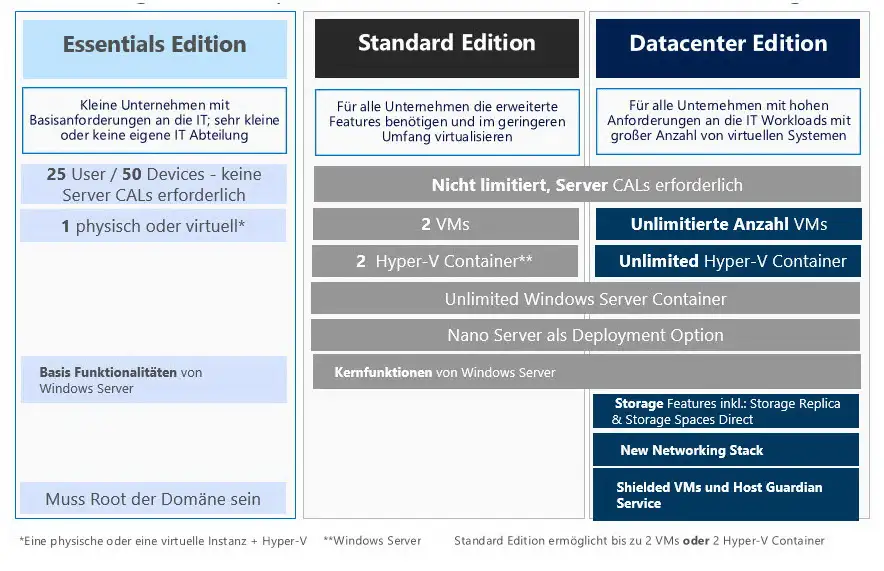
The licence is available on this page with 16 or 24 cores. It entitles you to run the physical server and additionally two virtual machines with Windows Server.
The most important features
- Active Directory for users, groups and sign-ins on the network
- File and print server with shares and permissions
- Hyper-V with two virtual Windows Server instances per licence
- Remote Desktop Services for terminal servers (with RDS CALs)
- Group Policy, DNS, DHCP and Windows Server Update Services
Who is Windows Server 2022 Standard for?
- small and medium-sized businesses with their own server
- medical practices, law firms and tax offices
- IT service providers for customer servers
- terminal server environments
New in Windows Server 2022
- Secured-core server with hardware-based protection
- TLS 1.3 enabled by default
- SMB encryption with AES-256
- Improved containers and Hyper-V
- Windows Admin Center for browser-based management
How core licensing works
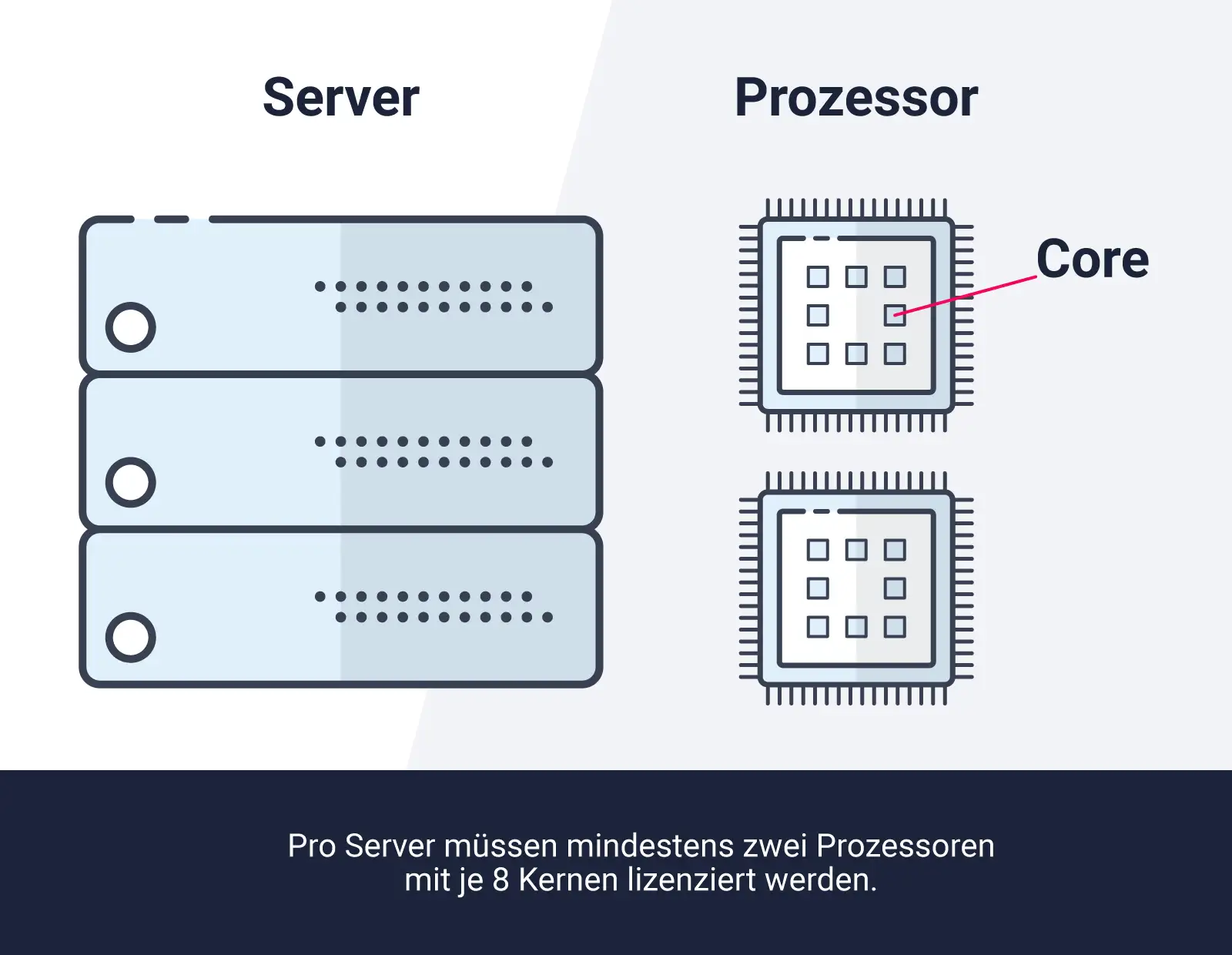
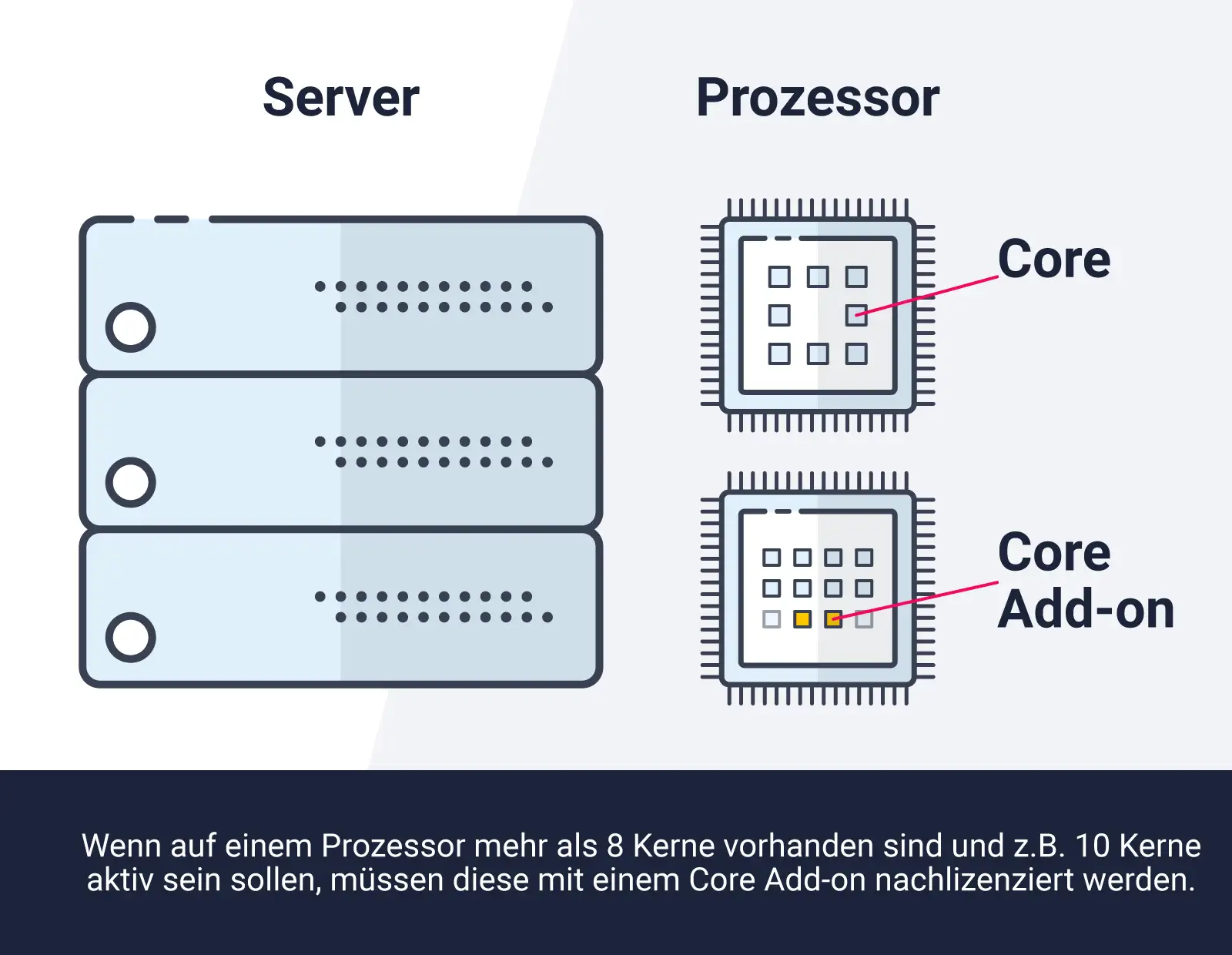
Since Windows Server 2016, licensing has been based on processor cores. All physical cores of a server must be covered, with at least 8 cores per processor and at least 16 cores per server. A licence with 16 cores therefore covers a typical server with one or two processors and up to 16 cores in total. If the server has more cores, cover the missing ones with an add-on licence or choose the 24-core variant.
Editions compared
| Standard (this item) | 2 virtual machines per fully licensed server |
| Windows Server 2022 Datacenter | unlimited virtual machines |
| Windows Server 2022 Essentials | for small companies up to 25 users, without CALs |
| Standard Add-on | additional cores for larger servers |
You will find more licences in the category Windows Server 2022.
Don’t forget client access licences (CALs)
Every user or device that accesses the server needs a client access licence (CAL). For Remote Desktop sessions, RDS CALs are also required. You will find the right licences under Windows Server CAL and Remote Desktop Services CAL.
Typical scenarios
- Central file server with user permissions for departments
- Domain controller with Active Directory for all workstations
- Terminal server for home offices and branch offices (with RDS CALs)
- Host for two virtual servers, e.g. ERP system and file server
Proof of licence and planning
Keep your invoice and licence documents safe – in a software audit they prove that your server is correctly licensed. Also document how many physical cores your servers have and which virtual machines run on them. If you are unsure which licences you need for your environment, we will be happy to advise you before you buy.
System requirements
- Processor: 64-bit processor, 1.4 GHz or faster
- Memory: 512 MB (Server Core), 2 GB for Desktop Experience
- Hard disk: at least 32 GB
- Network: Gigabit Ethernet adapter
- Other features: TPM 2.0 and UEFI with Secure Boot for certain security features
Installation and activation
- Download the installation file (ISO) via the link in our email.
- Create a bootable USB stick or mount the ISO in the hypervisor or via the server’s remote management.
- Choose the edition (with or without Desktop Experience) and install Windows Server.
- Activate with the product key supplied and set up roles such as Active Directory, file server or Hyper-V.
Frequently asked questions
How many virtual machines may I run?
With fully licensed cores, two virtual Windows Server instances. For more VMs, license the cores again or choose Datacenter.
What do 16 and 24 cores mean?
The number of processor cores covered. All physical cores of the server must be licensed, at least 16 per server.
Are CALs included?
No. Order client access licences for users or devices separately.
How is the server activated?
With the product key you receive by email after purchase. Our support team will help with any questions about activation.
Will I receive an invoice?
Yes, you receive a proper invoice with VAT shown for every order, with your company address on request.
May I run the server virtually?
Yes. The licence applies to the physical host; depending on the edition, you may run virtual Windows Server instances on it.
Do I need additional licences for Remote Desktop?
Yes. For Remote Desktop sessions you need RDS CALs in addition to the Windows Server CALs.
Delivery, invoice and support
- Delivery by e-mail: you will usually receive the product key, download link and installation guide within 5 to 30 minutes of payment (daily 09:00–21:00 CET). More under Shipping & payment.
- Invoice: every order comes with a proper invoice, with your company address on request.
- Origin of the licence: we source our licences from distributors and wholesalers in Europe. We explain exactly how this works on the page Buying legal software.
- Support: if you have questions about installation or activation, we help by e-mail (Mon–Sun 09:00–21:00 CET), phone (Mon–Fri 09:00–14:00 CET), live chat or remote support with TeamViewer.
Our goodwill promise
If the server version or edition you ordered is ever no longer available, we will supply the next higher version or edition with the same number of cores at no extra charge. You never pay more than the price at which you ordered.